

After 16 years of insisting that touchscreens don’t belong on the Mac, Apple has changed its. On October 28, it introduced the MacBook Pro with PROLED XDR Display, which combines a touchscreen with a tandem OLED display and an iPhone-style Dynamic Island, in 14-inch and 16-inch sizes starting at $2899. It arrived a day after two quieter updates: a 14-inch MacBook Pro with M6 and an iMac with M6. All three are available to pre-order now, with deliveries and in-store availability starting November 6.
Despite the timing, the touchscreen MacBook Pro isn’t an M6 Mac. It uses the same M5 Pro and M5 Max chips as the MacBook Pro with a conventional display, and the only M6 MacBook Pro is the 14-inch base model, which keeps the existing design. So choosing among these Macs has less to do with speed than with screens, ports, and easy-to-miss configuration details.
MacBook Pro Gets a Touchscreen
The PROLED model is the first Mac you can touch. In macOS 27, you can swipe to scroll, pinch to zoom, and double-tap a window to fill the screen or flick it to tile it into place, and your keyboard shortcuts and trackpad gestures still work. Apple says many existing apps work with touch right away, because macOS translates touches into clicks. Apple names Microsoft Word, Excel, PowerPoint, Outlook, Zoom, Adobe Lightroom, DaVinci Resolve, and Blender among the apps that will take fuller advantage of touch, but a footnote says those versions “will be available later this year.”
Apple also changed the hardware around the screen. A redesigned hinge is meant to keep the screen steady when you touch it, the 12MP Center Stage camera adds video stabilization, so your feed doesn’t shake when you tap the screen during a video call, and the glass has a fingerprint-resistant oleophobic coating (welcome on a screen you’ll be poking all day). Above the screen, a Dynamic Island shows Live Activities and Siri AI, much as it does on the iPhone, so you can answer a phone call, accept an AirDrop request, or pause music with a tap.
Spotlight also moves into the Dynamic Island, but only if Siri AI is available and enabled. Siri AI is still in beta, and since macOS 27.2 arrived on October 26, it has worked in English, French, Japanese, Korean, Portuguese, and Spanish, so if your Mac uses any other language (or you turn Siri AI off), Spotlight won’t move. Siri AI and other features that rely on Apple’s servers are subject to daily usage limits, with expanded access to be available “for a fee in the future.”
With M5 Pro, the PROLED model starts at $2899 (14-inch) or $3399 (16-inch); with M5 Max, it starts at $4499 or $4799. At matching configurations, it costs $400 more (CA$500 for the 14-inch and CA$600 for the 16-inch) than the M5 Pro and M5 Max models Apple still sells with the Liquid Retina XDR display. Only the PROLED M5 Max model offers 16 TB of storage, though (the Liquid Retina XDR models top out at 8 TB).
Because the chips are identical, that $400 buys the screen, touch, and a thinner, lighter laptop rather than performance. The tandem OLED display peaks at 2000 nits for both HDR and SDR content, whereas the Liquid Retina XDR display manages 1600 nits for HDR and 1000 nits for SDR, a difference that should be most obvious outdoors. It also offers a 10,000,000:1 contrast ratio, Adobe RGB in addition to P3, and ProMotion refresh rates from 10 Hz to 120 Hz. Slimmer borders stretch the 16-inch screen to 16.3 inches (from 16.2), and Apple’s tech specs put the 14-inch M5 Pro model at 3.0 pounds and the 16-inch at 4.0 pounds, compared to 3.5 and 4.7 pounds for the Liquid Retina XDR versions. If you work in bright light, nano-texture glass adds $150 (CA$225) to any MacBook Pro, PROLED or not.
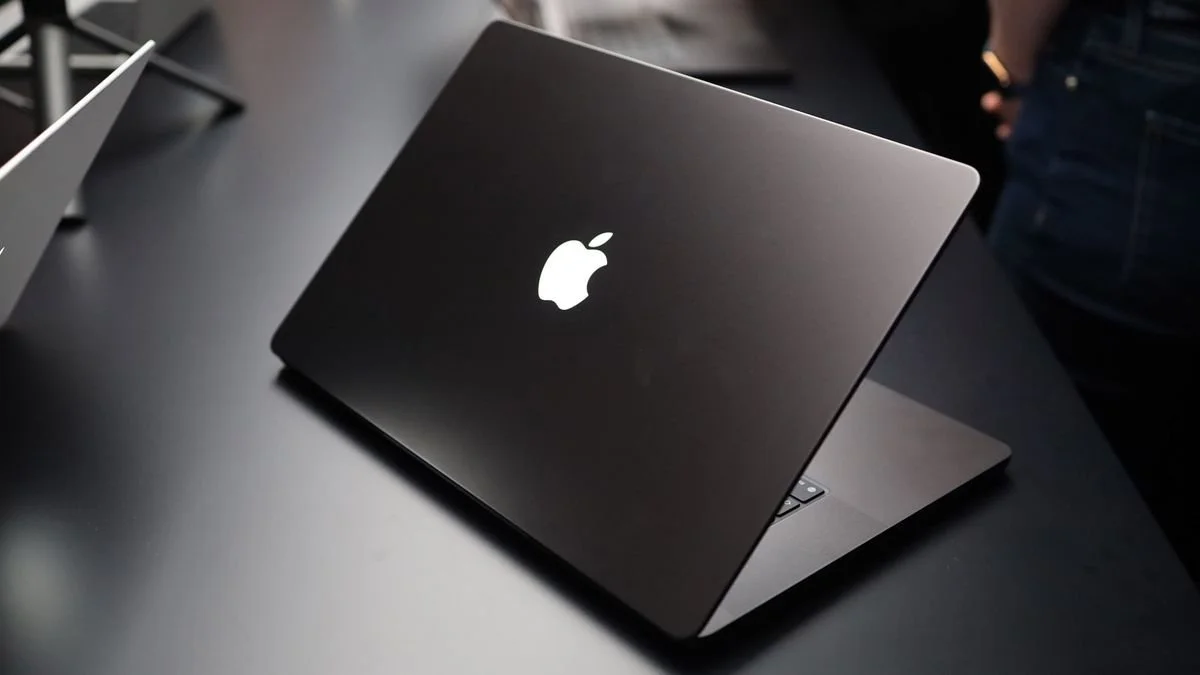
Longtime Mac users will spot one change from across the room. The Apple logo on the lid glows again, something no MacBook Pro has done since the 2016 redesign. Apple’s materials don’t mention it, but the logo was lit on the units Apple showed at launch, as AppleInsider reported. Otherwise, the PROLED model will feel familiar. It comes in space black or silver and keeps three Thunderbolt 5 ports, HDMI, an SDXC card slot, MagSafe 3, a headphone jack, and the backlit Magic Keyboard with Touch ID and Force Touch trackpad. Apple says a new woofer design gives the six speakers 50% deeper bass. For the first time, the speakers also get their own tuning for when the lid is closed and an external display is connected. Like the M6 MacBook Pro and iMac, Apple’s N1 chip supports Wi-Fi 7 and Bluetooth 6.
Apple’s “up to 24 hours” battery claim comes from a 16-inch M5 Pro model. For the 14-inch PROLED model, Apple lists 22 hours of video streaming with M5 Pro and 20 hours with M5 Max, the same figures it gives for the 14-inch Liquid Retina XDR models, so the OLED screen won’t buy you extra time away from a charger. Apple also says the PROLED models can charge to 50% in 30 minutes, but only with a 96W or higher adapter. The base 14-inch model (with the 15-core M5 Pro) comes with a 70W adapter, so add $79 for Apple’s 96W Power Adapter if you want fast charging. (Other configurations include a 96W or 140W adapter.)
Steve Jobs set the tone for Apple’s long opposition at the Back to the Mac event in 2010, saying that “touch surfaces don’t want to be vertical” and that after a while “your arm wants to fall off.” Craig Federighi told CNET in 2014 that touch wasn’t “the right interface” for what he called “a sit-down experience,” told Wired in 2018 that “lifting your arm up to poke a screen is a pretty fatiguing thing to do,” and in 2020 brushed off speculation that the roomier controls in macOS 11 Big Sur were preparation for touch. (Apple’s compromise in the meantime, the Touch Bar, arrived in 2016 and was gone by 2023.)
In an interview with Wired, Apple explained that the technology finally caught up. “The Mac is first and foremost an indirect input device,” CEO John Ternus said. “But I think there’s times when it’s comfortable and handy to have touch.” Hardware chief Johny Srouji said displays, Apple silicon, and software have finally “met our bar,” and marketing chief Greg Joswiak said pros who use iPhones and iPads all day now expect to touch their Macs, too. Apple also seems to have addressed Phil Schiller’s 2016 objection that touch would require a menu bar redesigned for fingers, since Wired reports that menus and the window buttons expand when a finger reaches them. Nobody outside Apple can yet judge whether the steadier hinge solves Jobs’s tired-arm problem, because no independent reviews have appeared.
M6 MacBook Pro Keeps the Familiar Design
The 14-inch MacBook Pro with M6 starts at $1999 (CA$2799) with 16 GB of memory and 1 TB of storage (there’s no 512 GB configuration). That’s the same price as the M5 model it replaces, because Apple raised the base MacBook Pro from $1699 to $1999 on June 25 amid a memory shortage. The M6 has a 12-core CPU and a 12-core GPU (two more cores in each than the M5), and Apple claims up to 30% faster graphics than the M5. Its specs also list up to 24 hours of video streaming, the longest of any 14-inch MacBook Pro.
Apart from the chip and new support for Wi-Fi 7 and Bluetooth 6, it’s the MacBook Pro you already know, in space black or silver, with the Liquid Retina XDR display and no touchscreen. Its three Thunderbolt 4 ports are slower than the Thunderbolt 5 ports on the M5 Pro and M5 Max models; it supports two external displays (M5 Pro supports three and M5 Max four), and it weighs 3.4 pounds. It also comes with a 70W adapter, so fast charging requires the $79 96W Power Adapter. Apple’s “up to 170 GB/s” memory bandwidth figure applies only with 24 GB or 32 GB of memory. The base 16 GB model gets 153 GB/s, a difference that’s unlikely to matter unless you run local AI models or heavy graphics work.
iMac Details to Check Before Ordering
The iMac with M6 replaces the M4 model and keeps its 24-inch 4.5K Retina display in seven colors (blue, purple, pink, orange, yellow, green, and silver). It gains Wi-Fi 7, Bluetooth 6, and 2.5-gigabit Ethernet, which Apple says is up to 2.5 times faster than the previous model’s wired connection. It starts at $1499 (CA$2099) for a model with a 10-core CPU and 10-core GPU, or $1699 (CA$2299) for a 12-core model, both with 16 GB of memory and 256 GB of storage. The $200 difference buys more than two extra cores, as Apple’s iMac tech specs show:
Ports: The 10-core model has two Thunderbolt/USB 4 ports, whereas the 12-core model has four Thunderbolt 4 ports.
External displays: The 10-core model supports one external display, and the 12-core model supports two.
Ethernet: 2.5-gigabit Ethernet is standard on the 12-core model and an option you can add to the 10-core model when you order.
Touch ID: The 12-core model includes the Magic Keyboard with Touch ID. The 10-core model’s Magic Keyboard lacks it, and the only Touch ID upgrade is the larger Magic Keyboard with Touch ID and Numeric Keypad.
Upgrade limits: The 10-core model tops out at 24 GB of memory and 1 TB of storage, and only the 12-core model offers 32 GB, 2 TB, and nano-texture glass.
Ports, display support, memory, and storage can’t be changed later, so if an iMac might someday need a second display or more than two Thunderbolt or USB-C devices without a hub, the 12-core model is the safer choice. Both come with a color-matched Magic Keyboard and Magic Mouse that charge over USB-C (a Magic Trackpad is optional). If the iMac will hang on a wall or an adjustable arm, order the version with the built-in VESA Mount Adapter.
Which New Mac Should You Buy?
As big a change as touch is for the Mac, most people won’t need it, so we’d choose based on what you do with your Mac:
Email, Office, and the Web: The $1999 M6 MacBook Pro is plenty of laptop. If the Mac never leaves the desk, get the iMac.
Photo, video, and 3D work: If you need Adobe RGB, extreme contrast, or a lighter machine to carry to shoots, the PROLED model is the one to get. Touch support in Final Cut Pro, Logic Pro, and Pixelmator Pro comes through Apple Creator Studio updates due “this November” (possibly after November 6), and Creator Studio costs $12.99 per month or $129 per year after the three free months that come with a new Mac.
The 16-inch touchscreen model: At $3399 and up, it makes sense only if you want that screen, since the $2999 Liquid Retina XDR 16-inch model has the same M5 Pro chip and the same 24-hour battery rating.
Multi-monitor desks: If you drive three or more displays or use Thunderbolt 5 storage and docks, skip the M6 and choose an M5 Pro or M5 Max model with either display.
Waiting for touch: If you want the PROLED model mainly for touch, there’s no harm in waiting for reviews and for touch-ready versions of the apps you rely on.
If you want a new Mac on November 6, order now, and if you’d like help choosing a configuration or moving your data from an older Mac, please get in touch with us before you order.
(Featured image by Apple)